webpack优化与插件集合
快速上手
webpack 是一款项目模块打包器
起步,快速上手移步至 webpack 概念
压缩优化
深度 TreeShaking
webpack-deep-scope-plugin
webpack-parallel-uglify-plugin
purifycss-webpack
HTML 压缩
new HtmlWebpackPlugin({
  inlineSource: ".css$",
  template: path.join(__dirname, `src/${pageName}/index.html`),
  filename: `${pageName}.html`,
  chunks: ["vendors", pageName],
  inject: true,
  minify: {
    html5: true,
    collapseWhitespace: true,
    preserveLineBreaks: false,
    minifyCSS: true,
    minifyJS: true,
    removeComments: false,
  },
});
图片压缩
module.exports = {
  module: {
    rules: [{
      test: /\.(gif|png|jpe?g|svg)$/i,
      use: [
        'file-loader',
        {
          loader: 'image-webpack-loader',
          options: {
            bypassOnDebug: true, // webpack@1.x
            disable: true, // webpack@2.x and newer
          },
        },
      ],
    }]
  },
};
CSS 压缩
optimize-css-assets-webpack-plugin
const OptimizeCSSAssetsPlugin = require('optimize-css-assets-webpack-plugin');

webpackConfig.optimization = {
  // 启动压缩
  minimize: !(isWatchMode() || process.env.BABEL_ENV === 'test'),
  minimizer: [
    // CSS资源优化
    new OptimizeCSSAssetsPlugin({
      cssProcessorOptions: {
        // discardComments: {removeAll: true },
        // 避免 cssnano 重新计算 z-index
        //  safe: true,
        // cssnano通过移除注释、空白、重复规则、过时的浏览器前缀以及做出其他的优化来工作,一般能减少至少 50% 的大小
        // cssnano 集成了autoprefixer的功能。会使用到autoprefixer进行无关前缀的清理。默认不兼容ios8,会去掉部分webkit前缀,比如flex
        // 所以这里选择关闭,使用postcss的autoprefixer功能
        autoprefixer: false
      }
    })
  ],
  };
打包速度优化
代码求值
prepack-webpack-plugin,对之前的代码进行求值,让下次打包更快!
const PrepackWebpackPlugin = require('prepack-webpack-plugin').default;

const configuration = {};

module.exports = {
  // ...
  plugins: [
    new PrepackWebpackPlugin(configuration)
  ]
};
速度分析

cache-loader
通过上面的插件(speed-measure-webpack-plugin),可以分析到哪个 loader 速度过慢,我们就可以使用 cache-loader
module.exports = {
  module: {
    rules: [
      {
        test: /\.ext$/,
        use: ['cache-loader', ...loaders],
        include: path.resolve('src'),
      },
    ],
  },
};
开启全局缓存
对整个开启全局缓存,强缓存,慎用
const HardSourceWebpackPlugin = require('hard-source-webpack-plugin');

module.exports = {
  plugins: [
    new HardSourceWebpackPlugin()
  ]
}
代码拆分
externals 配置去掉不需要编译的,可以抛弃 dll
splitChunks 公⽤库的代码拆分 去除打包
splitChunks: {
  chunks: 'async',
  minSize: 30000,
  minChunks: 1,
  maxAsyncRequests: 5,
  maxInitialRequests: 3,
  name: false,
  cacheGroups: {
    commons: {
      chunks: 'initial',
      minChunks: 2,
      maxInitialRequests: 5,
      minSize: 0,
      name: 'commons',
    },
  },
}
分离⻚⾯公⽤包 html-webpack-externals-plugin
动态引入
@babel/plugin-syntax-dynamic-import
@babel/plugin-syntax-dynamic-import 用以解析识别import()动态导入语法---并非转换,而是解析识别
.babelrc
{
  "plugins": ["@babel/plugin-syntax-dynamic-import"]
}
动态polyfill
- js脚本直接引入,不编译
<script src="https://cdn.polyfill.io/v2/polyfill.min.js?feature=Map,Set"></script>
使用动态,它会根据你的浏览器UA头,判断你是否支持某些特性,从而返回给你一个合适的polyfill。https://cdn.polyfill.io/v3/
<script type="module" src="main.js"></script>
<script nomodule src="main.es5.js"></script>
- 项目配置
$ npm install -S @babel/polyfill

# 项目入口引入 @babel/polyfill
import "@babel/polyfill"
此时打包会发现体积很大,下面配置根据自己的业务代码去加载对应的 polyfill
{
  test: /\.js$/,
  exclude: /node_modules/,
  loader: "babel-loader",
  options: {
    "presets": [['@babel/preset-env', {
      useBuiltIns: 'usage'
    }]]
  }
}

// 设置浏览器兼容版本
{
  loader: "babel-loader",
  options: {
    "presets": [['@babel/preset-env', {
      "targets": {
        "edge": "17",
        "firefox": "60",
        "chrome": "67",
        "safari": "11.1",
      }
    ]]
  }
},
配置优化
resolveLoader
如果我们编写了自定义的 Loarder,我们 需要引用 path.resolve(__dirname, './loaders/replaceLoader.js') 很不雅观,我们可以通过设置 resolveLoader 来达到和正常的 loader 引入一样。
resolveLoader: {
  modules: ['node_modules', 'loaders']
}
resolve
合理的配置 alias 可以让我们在引用路径的时候更加方便,过多的配置会影响打包速度
resolve: {
  alias: {
    '@': resolve('src'),
    '@less': resolve('less'),
    '@datas': resolve('datas'),
  }
}
shimming
使用 shimming 的配置如下
const webpack = require('webpack');

plugins: [
  new webpack.ProvidePlugin({
      '$': 'jquery',
  })
]
如果一个模块中使用了 $ 字符串,就会在模块中自动得引用jquery
生产力工具
打包进度条
友好错误提示
friendly-errors-webpack-plugin 识别某些类别的webpack错误,并清理,聚合和优先级,以提供更好的开发人员体验。
配合 webpack-dev-server 使用
const FriendlyErrorsWebpackPlugin = require('friendly-errors-webpack-plugin');

new FriendlyErrorsWebpackPlugin({
  compilationSuccessInfo: {
    messages: ['You application is running here http://localhost:8080'],
    notes: [
      'Some additionnal notes to be displayed unpon successful compilation',
    ],
  },
  onErrors: function (severity, errors) {
    //安装node-notifier 只想提示错误的话
  },
  quiet: true,
  clearConsole: true,
}),
通知提示运行状态
const WebpackBuildNotifierPlugin = require('webpack-build-notifier');

module.exports = {
  plugins: [
    new WebpackBuildNotifierPlugin({
      title: "My Project Webpack Build",
      logo: path.resolve("./img/favicon.png"),
      suppressSuccess: true
    })
  ],
}

可视化分析打包文件
webpack-bundle-analyzer 是一款在线可视化分析你打包文件的工具,可以让你清楚的看到每个文件的大小
const BundleAnalyzerPlugin = require('webpack-bundle-analyzer').BundleAnalyzerPlugin;

module.exports = {
  plugins: [
    new BundleAnalyzerPlugin()
  ]
}
webpack 分析面板
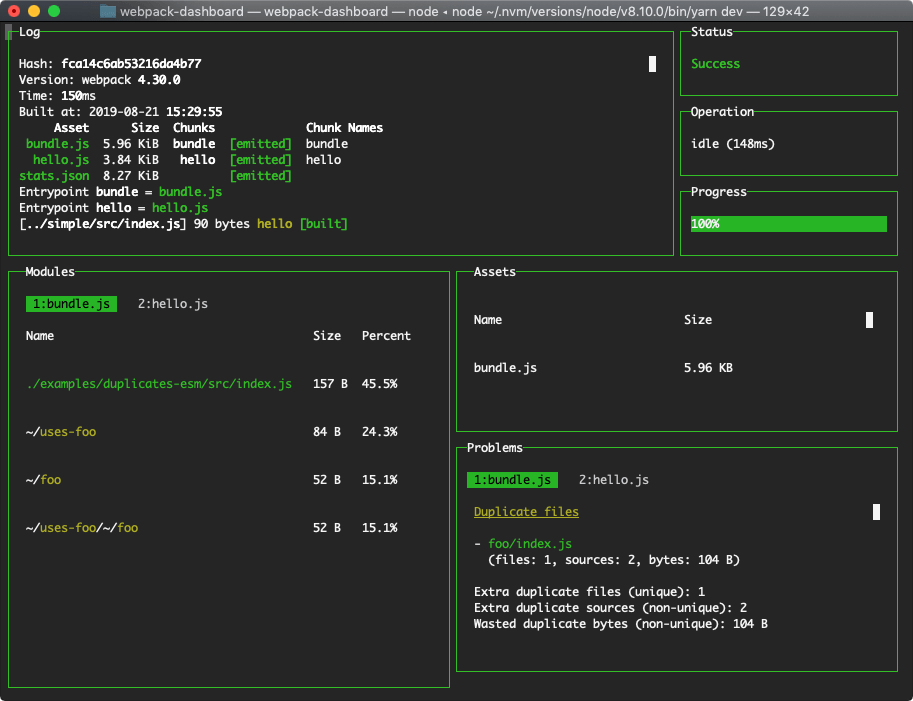
webpack-dashboard 增强了 webpack 的输出,包含依赖的大小、进度和其他细节
资源引用
inline-manifest-webpack-plugin 把 runtime 放到 html 里
html-inline-css-webpack-plugin 把一些核心的CSS放到⻚面内部
copy-webpack-plugin 用就是拷贝文件,或者文件夹
更多构建工具
彩蛋
你是否经常会开多个终端窗口,一多人就懵逼了,别怕
node-bash-title 设置终端 title
set-iterm2-badge 设置终端背景
const setTitle = require('node-bash-title');
const setIterm2Badge = require('set-iterm2-badge');

setTitle('🍻  Webpack开发环境配置');
setIterm2Badge('🍻 Dev开发');