Vuex
概述
官方解释 👉👉 Vuex 是一个专门为Vue.js应用程序开发的状态管理模式,它采用了集中式存储管理所有组件的公共状态,并以相应的规则保证状态以一种可预测的方式发生变化。
我的理解 👉👉 Vuex 就是一个数据存储库,解决组件之间的统一状态、数据的共享问题,实现数组之间的持久化。
父组件 A <-----> 子组件 A1 (传递数据,可以使用 props, emit)
父组件 B <-----> 子组件 B1
那么, 组件A 组件B 同时都需要使用一组数据,怎么办呢?那么就可以用Vuex了。
流程图
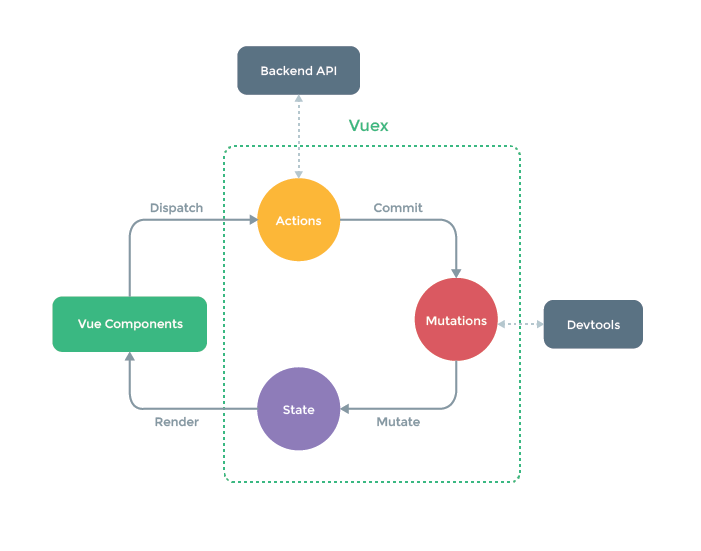
Vue Components 指的是vue组件,组件会触发(dispatch) 一些事件或者动作(Actions);
由于在Vuex中,数据是集中存储管理的,接收到动作,会把动作提交(Commit) 到 Mutations 中;
Mutations 就会去改变(Mutate) State 中的数据;
当 State 中的数据发生改变后, 就会重新渲染(Render) 到 Vue Components 中,组件展示功能后的数据;
开始使用
npm install vuex --savemain.js添加
import Vuex from 'vuex'

Vue.use( Vuex );

const store = new Vuex.Store({
  //待添加
})

new Vue({
  el: '#app',
  store,
  render: h => h(App)
});
State
用来定义属性 (状态、数据)
可以将 State 看作是所有组件的data,用于保存所有组件的公共数据。
// main.js
const store = new Vuex.Store({
  state: {
    count: 10
  }
});

// app.vue
export default {
  data() {
    return {
      count: this.$store.state.count // 10
    }
  }
};
mapState 辅助函数
用来获取 State, 不建议使用,建议用 mapGetters
// app.vue
import { mapState } from 'vuex';

export default {
  computed: {
    ...mapState(['count'])
  }
}
直接读取变量count, 就能拿到 10
📝
mapState 要放在computed里,否则不生效。亲测放在data中无反应。
Getters
用来获取属性 (状态、数据)
// main.js
const store = new Vuex.Store({
  ...
  getters: {
    count: (state) => {
      return state.count
    },

    // 错误写法
    count(state) {
      return state.count
    }
  }
});

// app.vue
export default {
  computed: {
    count () {
      return this.$store.getters.count
    }
  },

  // 错误写法
  data() {
    return {
      count: this.$store.getters.count
    }
  }
}
📝
由于只有把 count 放在computed中,更改了数据,才会重新渲染页面。
所以 this.$store.getters.count 需要为一个函数,才能符合computed的语法。
mapGetters 辅助函数
获取 Getters
// app.vue
import { mapGetters } from 'vuex';

export default {
  computed: {
    ...mapGetters(['count'])
  }
}
Actions
定义动作,commit 到 Mutations中,然后更改State ( 如 ajax、或者后台action路由动作等)
用于 处理异步
// main.js
const store = new Vuex.Store({
  ...
  actions: {
    add({commit}) {
      add('increment');
    }
  },
});

// app.vue
<button @click="add">增加</button>

export default {
  methods: {
    add() {
      this.$store.dispatch('add');
    }
  }
}
mapActions 辅助函数
直接调用Actions,相当于调用了dispatch
// app.vue
import {mapActions } from 'vuex';

export default {
  methods: {
    ...mapActions(['add'])
  }
}
Mutations
定义变化,处理 State
Mutations -> 必须是同步函数
// main.js
const store = new Vuex.Store({
  ...
  mutations: {
    reduce(state, payload) {
      state.count = state.count - payload;
    }
  }
});

// app.vue
<button @click="reduce">减少</button>

export default {
  methods: {
    reduce() {
      this.$store.commit('reduce', 2); // 提交reduce, payload为2
    }
  }
}
mapMutations 辅助函数
// app.vue
<button @click="reduce(2)">减少</button>

import { mapMutations } from 'vuex';

export default {
  methods: {
    ...mapMutations(['reduce'])
  }
}

// 或者也可写成以下写法
<button @click="minus">减少2</button>

export default {
  methods: {
    ...mapMutations(['reduce']),
    minus() {
      this.reduce(2); // 指的就是 ...mapMutations(['reduce'])
    }
  }
}