手写 Vuex3.x
上一章学习过 Vuex 怎么用,现在尝试手写一下
核心原理
Vuex 本质是一个对象
对象上有两个属性,分别是
Store 类和install 方法install 方法的作用:将 Store 这个实例挂载在所有组件上,是同一个实例
Store 类,拥有
commit、dispatch这些方法。Store 类将传入的 state 包装成 data,作为 new Vue 的参数,从而实现了 state 值的响应式
创建项目
用 vue-cli 自定义创建项目, 只要 Vuex + Babel 就好,生成一个壳子,将多余的内容删掉。
目录如下:
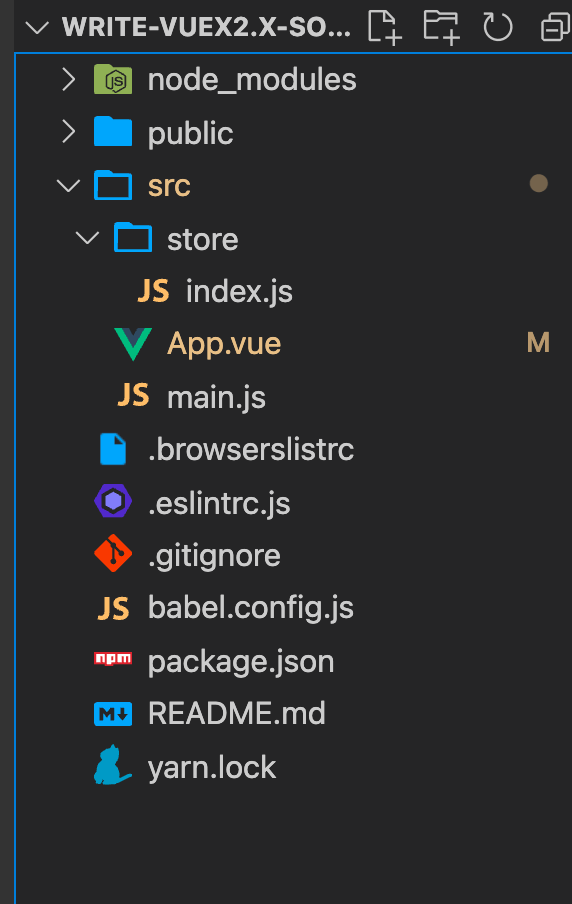
剖析 Vuex 本质
思考:Vue 项目中是怎么引用 Vuex 的呢?
安装 Vuex,
import Vuex from 'vuex'const store = new Vuex.Store({...}),store 作为参数的一个属性值
最后,通过 Vue.use(Vuex),使每个组件上都拥有 store 实例
从上面可以得出:
是通过
new Vuex.Store()获得的 store 实例,那么也就是说 Vuex 其实是一个对象,对象中有 Store 这个属性因为是用 import 引入的,实际上导出一个对象的引用
那么,我们可以初步假设
// myVue.js
class Store {}

const Vuex = {
  Store
};

export default Vuex;
- 还是用了 Vue.use(plugin),而 Vue.use(),参数可以是一个
Object或Function。对象则必须提供 install 方法,函数的话这被当作 install 方法。
所以 Vuex 必须有 install 方法,因为我们已经假设它是一个对象了,那必须提供 install 方法。
// myVue.js
class Store {}

const install = function() {};

const Vuex = {
  Store,
  install
};

export default Vuex;
编写 myVue
新建 store -> myVue.js

将 store -> index.js 里引入的 Vuex 改成自己写的 myVue
import Vue from 'vue';
// import Vuex from 'vuex'

// 引入自己写的
import Vuex from './myVue';

Vue.use(Vuex);

export default new Vuex.Store({
  state: {},
  mutations: {},
  actions: {},
  modules: {}
});
运行看看有没有问题,没有问题就证明猜想成功,接下来继续。
分析 Vue.use
上面浅谈了一下,现在来分析
Vue.use(plugin)
入参
参数为:Object | Function
用法
安装 Vue.js 插件, 如果插件是一个对象,必须提供 install 方法。
如果插件是一个函数,它会被作为 install 方法。
调用 install 方法时,会将 Vue 作为参数传入。
install 方法被同一个插件多次调用时,插件也只会被安装一次。
作用
注册插件,此时只需要调用 install 方法,并将 Vue 作为参数传入即可。
注意两点:
插件类型,可以是 install 方法,也可以是包含 install 方法的对象
插件只能被安装一次,保证插件列表中不能有重复的插件
Vue 源码如何实现 use
Vue.use = function(plugin: Function | Object) {
  const installedPlugins = this._installedPlugins || (this._installedPlugins = []);

  // 判断插件是否已被注册,已注册的话中断执行
  if (installedPlugins.indexOf(plugin) > -1) {
    return this;
  }

  // 将类数组转换成数组,同时截取掉第一个参数,将剩余的参数复制给args
  const args = Array.prototype.slice.call(arguments, 1); // 源码上写的是toArray(arguments, 1),我这里为了直观

  // 将Vue塞到参数列表中,保证install方法执行时第一个参数是Vue,其余参数是注册插件时传入的参数
  args.unshift(this);

  if (typeof plugin.install === 'Function') {
    plugin.install.apply(plugin, args);
  } else if (typeof plugin === 'Function') {
    // 此时plugin不是对象,所以不需要更改作用域
    plugin.apply(null, args);
  }
  // 最后将插件推入installedPlugins中,保证相同的插件不会被反复注册
  installedPlugins.push(plugin);
  return this;
};
实现 plugin
新建 plugin 文件夹,如图所示:
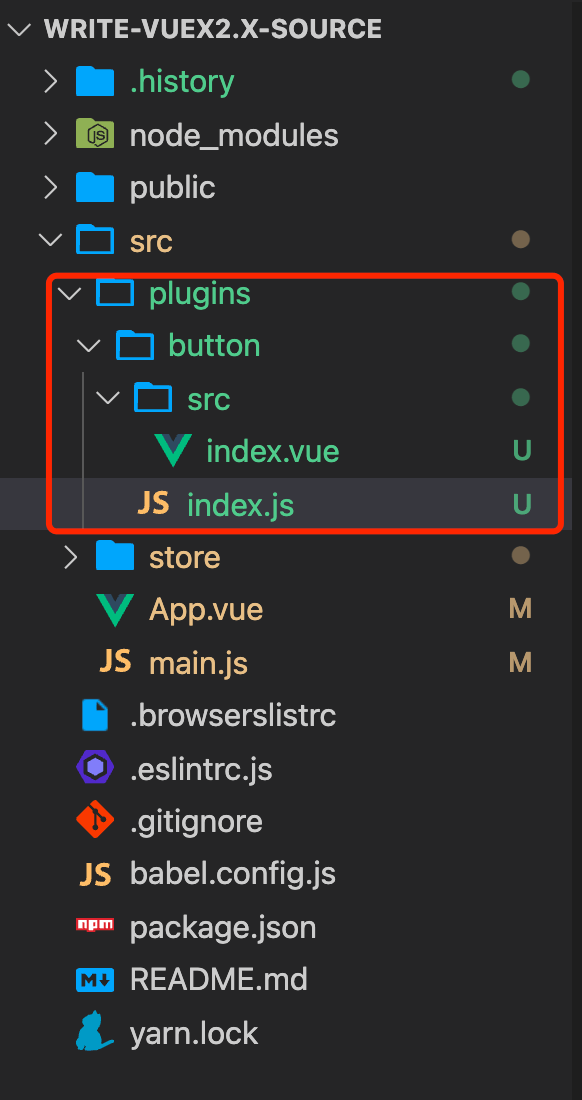
新建 CreateButton 插件代码
// index.vue 样式代码部分不展示了
<template>
  <button class="create-button primary">
    <span>
      <slot></slot>
    </span>
  </button>
</template>

<script>
export default {
  name: "CreateButton",
};
</script>


// index.js
import CreateButton from './src/index.vue';

// 给CreateButton对象添加install方法,入参为Vue
CreateButton.install = function (Vue) {
  // 给Vue注册名为'CreateButton'的全局组件
  Vue.component(CreateButton.name, CreateButton);
}

export default CreateButton;
插件完成,主要就是 install 方法,注册插件,最后在用 Vue.use 使用这个插件。
// main.js
import Vue from 'vue';
import App from './App.vue';
import store from './store';
import CreateButton from './plugins/button/index';

Vue.config.productionTip = false;

// 使用插件
Vue.use(CreateButton);

new Vue({
  store,
  render: h => h(App)
}).$mount('#app');
这时候,已经成功了,可以到页面上直接使用。
// 随便一个Vue页面 直接用就可以了
<CreateButton>plugin 按钮</CreateButton>
最后长这样 👇
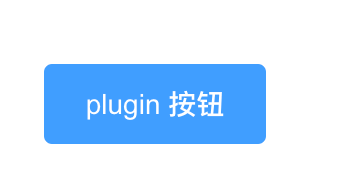
大功告成!
完善 install 方法
因为通过 Vue.use(Vuex),可以使得每个组件都拥有 store 实例。并且使用 Vue.use 方法。
那么需要考虑几个点:
需要提供 install 方法(这个上面说过了
需要将 Vue 作为参数传进去
如果让每个组件都拥有 store 实例呢?那么就可以使用 mixin,将内容混合到 Vue 的初始参数 options 中
在哪个生命周期操作呢?beforeCreate 为什么不是 created 呢?因为 created 的时候,已经完成了初始化,生成了$options 了。
判断当前组件是否是根组件,是根组件的话,就将我们传入的 store 挂载根组件实例上 属性名为
$store若是子组件,将根组件的$store复制给子组件,此时是引用的复制,都是指向同一个$store
const install = function(Vue) {
  Vue.mixin({
    beforeCreate() {
      // 父组件,将store挂载在Vue组件实例上
      if (this.$options?.store) {
        this.$store = this.$options.store;
      } else {
        this.$store = this.$parent?.$store;
      }
    }
  });
};
实现 Vuex 的 state
<p>my name is {{ this.$store.state.name }}</p>
可以通过这个语句获取 state 的值
可以看到我们是这样使用 Store 的
export default new Vuex.Store({
  state: {
    name: 'kk',
    age: 16
  },
  mutation: {},
  actions: {},
  modules: {}
});
也就是将这一部分当作参数了
{
  state: {
    name: 'kk',
    age: 16
  },
  mutation: {},
  actions: {},
  modules: {}
}
那我们可以直接在 Class Store 中获取这个对象
// myVue.js
class Store {
  constructor(options) {
    this.state = options.state || {};
  }
}
试试看是否成功
<template>
  <div id="app">
    <div>
      <p>state: my name is {{ this.$store.state.name }}</p>
    </div>
  </div>
</template>
注意,到现在为止 state 值还不是响应式的。
所以可以将 state 作为 data 传入 new Vue()中,即可以实现响应式
class Store {
  constructor(options) {
    // 丢到new Vue({data: xxx})里面,变成响应式
    this.vm = new Vue({
      data: {
        state: options.state
      }
    });
  }
}
但是这样的话,获取 state 的就要变成this.$store.vm.state.name,跟我们平常用的不一致。
所以,可以通过 get 方法转换一下。
class Store {
  constructor(options) {
    this.vm = new Vue({
      data: {
        state: options.state
      }
    });
  }

  // 添加get函数,在获取state时,直接取this.vm.state 不用通过this.$store.vm.state获取
  get state() {
    return this.vm.state;
  }
}
再试试看,是不是 ok 了~

实现 getters
this.getters = {},为什么不直接赋值空对象,而是用 Object.create(null),这样会不会继承原型链上的属性
通过 Object.defineProperty()为 getters 上的每一个属性都添加上 get 方法
利用 Function.prototype.call()改变作用域
// myVue.js
class Store {
  constructor(options) {
    // 省略

    const getters = options.getters || {};
    // 不用考虑会和原型链上的属性重名问题
    this.getters = Object.create(null);
    Object.keys(getters).forEach(key => {
      Object.defineProperty(this.getters, key, {
        // 为this.getters每一项添加get方法
        get: () => {
          // 把state传入,更改this指向
          return getters[key].call(this, this.state);
        }
      });
    });
  }
}
// index.js
export default new Vuex.Store({
  state: {
    name: 'kk'
    // age: 16
  },
  getters: {
    getName(state) {
      return state.name;
    }
  },
  mutations: {},
  actions: {},
  modules: {}
});
<template>
  <div id="app">
    <CreateButton>plugin 按钮</CreateButton>
    <div>
      <p>state: my name is {{ this.$store.state.name }}</p>
      <p>getter: my name is {{ this.$store.getters.getName }}</p>
    </div>
  </div>
</template>
来吧,展示

实现 mutations
跟 getter 差不多,多了个 commit 函数触发
// myVue.js
class Store {
  constructor(options) {
    // 省略

    // 实现mutations
    const mutations = options.mutations || {};
    this.mutations = Object.create(null);
    Object.keys(mutations).forEach(key => {
      this.mutations[key] = params => {
        // 更改this指向
        mutations[key].call(this, this.state, params);
      };
    });
  }

  // 提供触发mutations所需的commit方法
  commit = (eventName, params) => {
    this.mutations[eventName](params);
  };
}
// index.js
export default new Vuex.Store({
  // ...
  mutations: {
    changeName(state, newName) {
      state.name = newName;
    }
  }
<template>
  <div id="app">
    <div>
      <p>state: my name is {{ this.$store.state.name }}</p>
      <p>getter: my name is {{ this.$store.getters.getName }}</p>
      <button @click="change">mutations按钮,改变name</button>
    </div>
  </div>
</template>

<script>
export default {
  name: 'App',
  methods: {
    change() {
      this.$store.commit('changeName', '改变后的mutations~~');
    }
  }
};
</script>
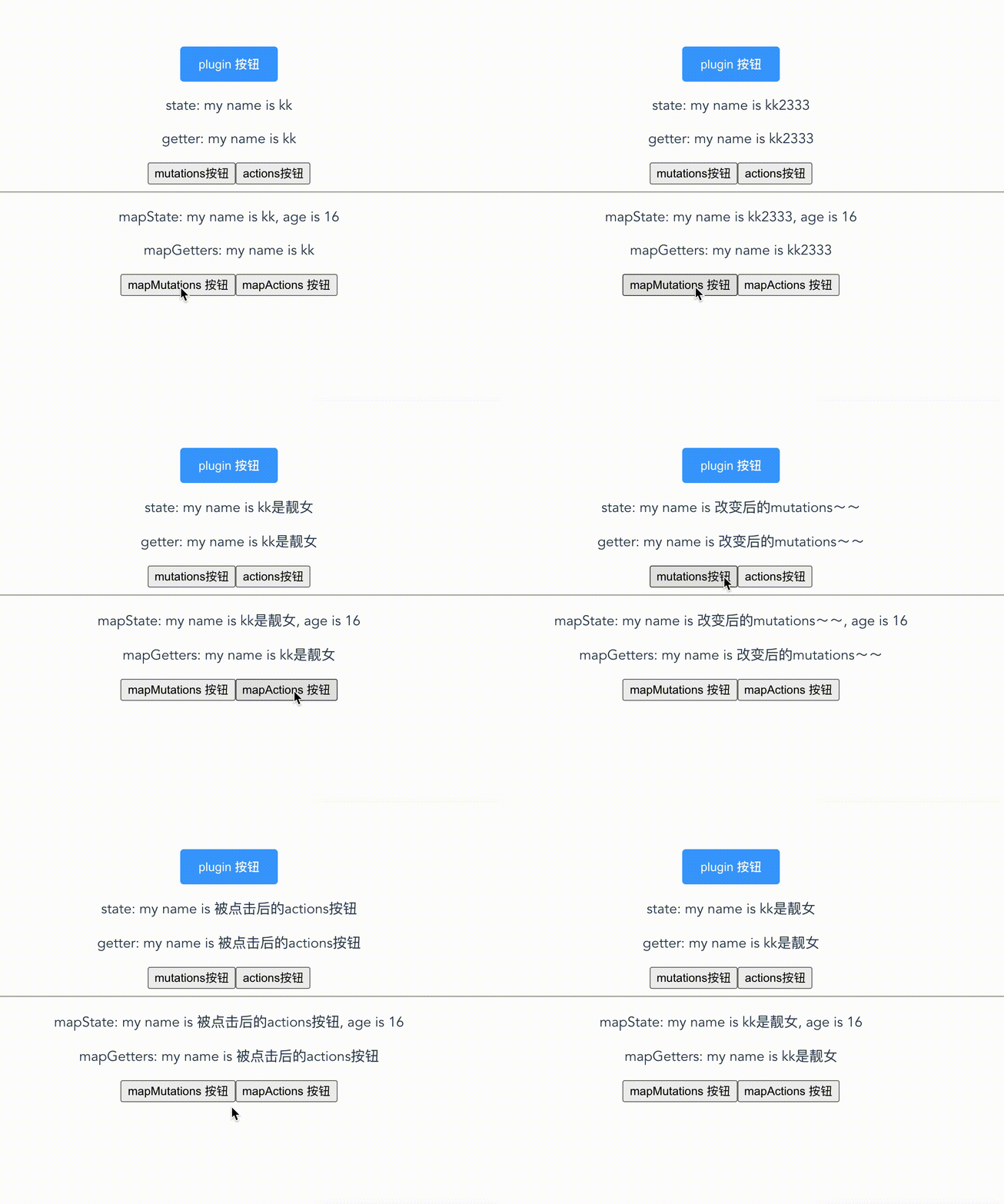
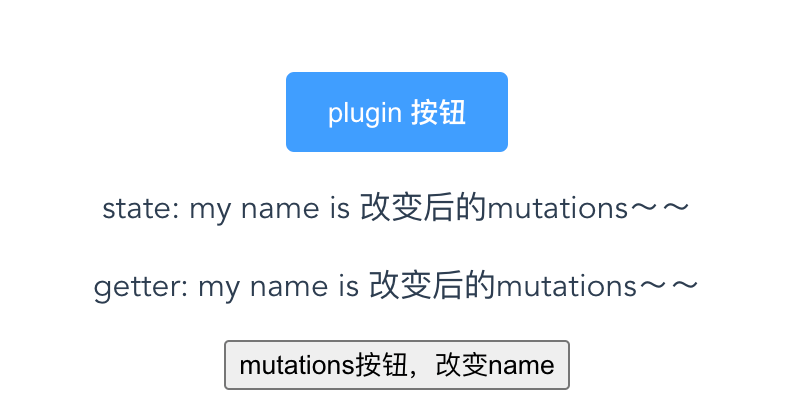
效果图如下:
实现 actions
跟 mutations 差不多,没多少难度
// myVue.js
class Store {
  constructor(options) {
    // 省略

    // 实现actions
    const actions = options.actions || {};
    this.actions = Object.create(null);
    Object.keys(actions).forEach(key => {
      this.actions[key] = params => {
        // 更改this指向,第二个this指向的是Store,将它本身传入
        actions[key].call(this, this, params);
      };
    });
  }

  // 提供触发actions所需的dispatch方法
  dispatch = (eventName, params) => {
    this.actions[eventName](params);
  };
}
// index.js
export default new Vuex.Store({
  // ...

  actions: {
    changeNameAsync(context, newName) {
      // 用setTimeout模拟异步操作
      setTimeout(() => {
        // 在这里调用 mutations 中的处理方法
        context.commit('changeName', newName);
      }, 100);
    }
  }
});
<template>
  <div id="app">
    <div>
      <p>state: my name is {{ this.$store.state.name }}</p>
      <p>getter: my name is {{ this.$store.getters.getName }}</p>
      <button @click="change">mutations按钮</button>
      <button @click="changeAsync">actions按钮</button>
    </div>
  </div>
</template>

<script>
export default {
  name: 'App',
  methods: {
    change() {
      this.$store.commit('changeName', '改变后的mutations~~');
    },
    changeAsync() {
      this.$store.dispatch('changeNameAsync', '被点击后的actions按钮');
    }
  }
};
</script>
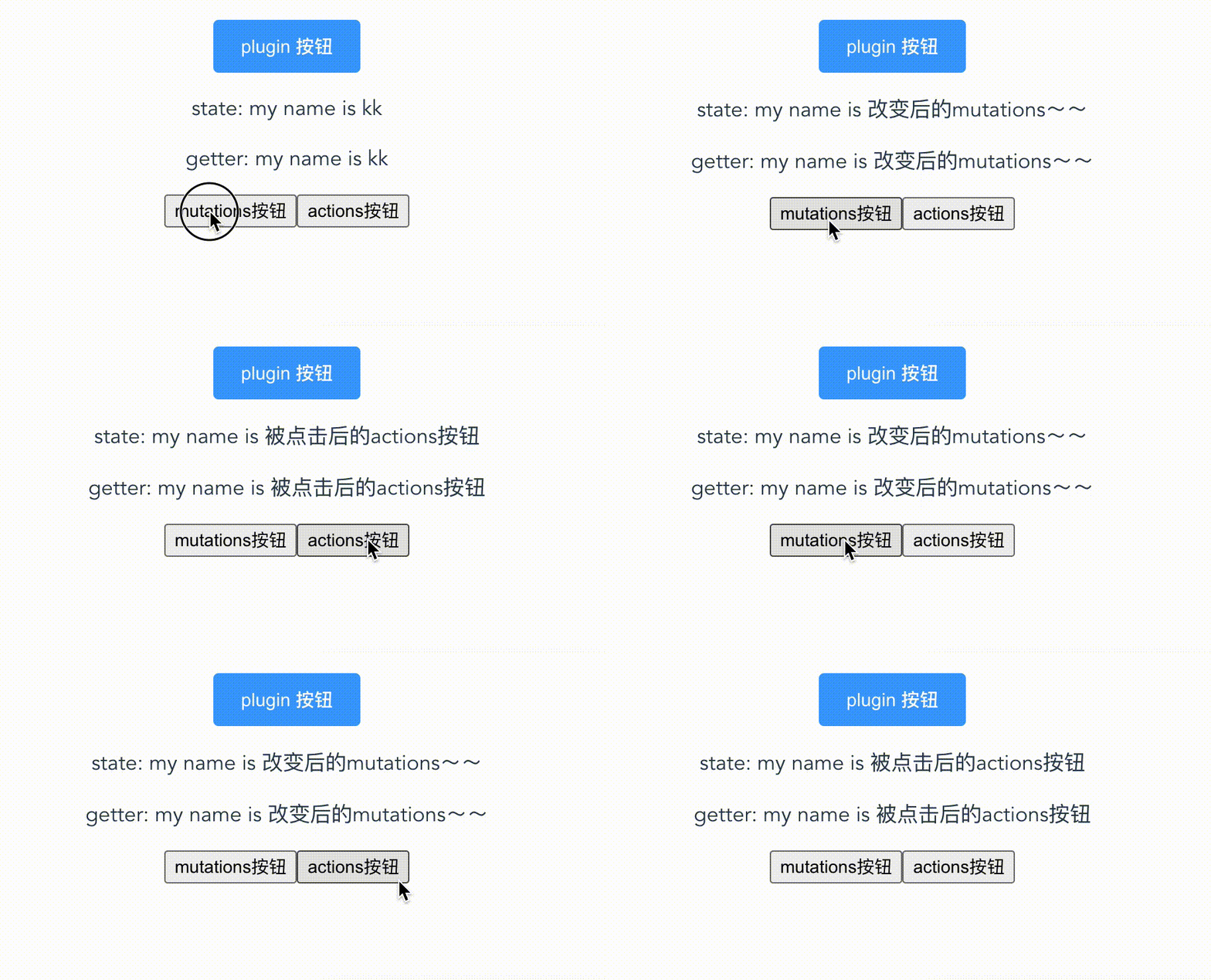
效果图如下:
到这里告一段落!
接下来实现几个辅助函数,mapState、mapGetters、mapMutations、mapActions
实现 mapState
// 实现mapState
const mapState = params => {
  if (!Array.isArray(params)) {
    throw new Error('Sorry,乞丐版Vuex,只支持数组');
  }

  // 初始化obj
  let obj = {};
  params.forEach(item => {
    obj[item] = function() {
      return this.$store.state[item];
    };
  });
  return obj;
};
实现 mapGetters
// 实现mapGetters
const mapGetters = params => {
  if (!Array.isArray(params)) {
    throw new Error('Sorry,乞丐版Vuex,只支持数组');
  }

  let obj = {};
  params.forEach(item => {
    obj[item] = function() {
      return this.$store.getters[item];
    };
  });
  return obj;
};
实现 mapMutations
// 实现mapMutations
const mapMutations = params => {
  if (!Array.isArray(params)) {
    throw new Error('Sorry,乞丐版Vuex,只支持数组');
  }

  let obj = {};
  params.forEach(item => {
    obj[item] = function(args) {
      return this.$store.commit(item, args);
    };
  });
  return obj;
};
实现 mapActions
// 实现mapActions
const mapActions = params => {
  if (!Array.isArray(params)) {
    throw new Error('Sorry,乞丐版Vuex,只支持数组');
  }

  let obj = {};
  params.forEach(item => {
    obj[item] = function(args) {
      return this.$store.dispatch(item, args);
    };
  });
  return obj;
};
完整代码
// myVue.js
class Store {
  constructor(options) {
    // 丢到new Vue({data: xxx})里面,变成响应式
    this.vm = new Vue({
      data: {
        state: options.state
      }
    });

    // 实现getters
    const getters = options.getters || {};
    this.getters = Object.create(null);
    Object.keys(getters).forEach(key => {
      Object.defineProperty(this.getters, key, {
        // 为this.getters每一项添加get方法
        get: () => {
          // 把state传入,更改this指向
          return getters[key].call(this, this.state);
        }
      });
    });

    // 实现mutations
    const mutations = options.mutations || {};
    this.mutations = Object.create(null);
    Object.keys(mutations).forEach(key => {
      this.mutations[key] = params => {
        // 更改this指向
        mutations[key].call(this, this.state, params);
      };
    });

    // 实现actions
    const actions = options.actions || {};
    this.actions = Object.create(null);
    Object.keys(actions).forEach(key => {
      this.actions[key] = params => {
        // 更改this指向,第二个this指向的是Store,将它本身传入
        actions[key].call(this, this, params);
      };
    });
  }

  // 添加get函数,在获取state时,直接取this.vm.state 不用通过this.$store.vm.state获取
  get state() {
    return this.vm.state;
  }

  // 提供触发mutations所需的commit方法
  commit = (eventName, params) => {
    this.mutations[eventName](params);
  };

  // 提供触发actions所需的dispatch方法
  dispatch = (eventName, params) => {
    this.actions[eventName](params);
  };
}

const install = function(Vue) {
  // 全局注册混入 这样在所有的组件都能使用 $store
  Vue.mixin({
    // 在 beforeCreate 这个时候把 $store 挂载到 Vue 上
    beforeCreate() {
      // 判断 Vue 传递的对象是否有 store 需要挂载,有的将store挂载在Vue实例上
      if (this.$options?.store) {
        this.$store = this.$options.store;
      } else {
        this.$store = this.$parent?.$store;
      }
    }
  });
};

// 实现mapState
const mapState = params => {
  if (!Array.isArray(params)) {
    throw new Error('Sorry,乞丐版Vuex,只支持数组');
  }

  // 初始化obj
  let obj = {};
  params.forEach(item => {
    obj[item] = function() {
      return this.$store.state[item];
    };
  });
  return obj;
};

// 实现mapGetters
const mapGetters = params => {
  if (!Array.isArray(params)) {
    throw new Error('Sorry,乞丐版Vuex,只支持数组');
  }

  let obj = {};
  params.forEach(item => {
    obj[item] = function() {
      return this.$store.getters[item];
    };
  });
  return obj;
};

// 实现mapMutations
const mapMutations = params => {
  if (!Array.isArray(params)) {
    throw new Error('Sorry,乞丐版Vuex,只支持数组');
  }

  let obj = {};
  params.forEach(item => {
    obj[item] = function(args) {
      return this.$store.commit(item, args);
    };
  });
  return obj;
};

// 实现mapActions
const mapActions = params => {
  if (!Array.isArray(params)) {
    throw new Error('Sorry,乞丐版Vuex,只支持数组');
  }

  let obj = {};
  params.forEach(item => {
    obj[item] = function(args) {
      return this.$store.dispatch(item, args);
    };
  });
  return obj;
};

const Vuex = {
  Store,
  install
};

export { mapState, mapGetters, mapMutations, mapActions };

// 导出Store和install
export default Vuex;
<template>
  <div id="app">
    <CreateButton>plugin 按钮</CreateButton>
    <div>
      <p>state: my name is {{ this.$store.state.name }}</p>
      <p>getter: my name is {{ this.$store.getters.getName }}</p>
      <button @click="change">mutations按钮</button>
      <button @click="changeAsync">actions按钮</button>
    </div>

    <hr />
    <div>
      <p>mapState: my name is {{ name }}, age is {{ age }}</p>
      <p>mapGetters: my name is {{ getName }}</p>
      <button @click="changeName('kk2333')">mapMutations 按钮</button>
      <button @click="changeNameAsync('kk是靓女')">mapActions 按钮</button>
    </div>
  </div>
</template>

<script>
// 导入
import { mapState, mapGetters, mapMutations, mapActions } from './store/myVue';

export default {
  name: 'App',
  components: {},
  computed: {
    ...mapState(['name', 'age']),
    ...mapGetters(['getName'])
  },
  methods: {
    change() {
      this.$store.commit('changeName', '改变后的mutations~~');
    },
    changeAsync() {
      this.$store.dispatch('changeNameAsync', '被点击后的actions按钮');
    },
    ...mapMutations(['changeName']),
    ...mapActions(['changeNameAsync'])
  }
};
</script>