javascript && QA
karma 使用
安装依赖
# 全局安装
sudo npm i karma -g

# 初始化
karma init

# 安装依赖
npm i karma-jasmine jasmine-core -D

# 无头浏览器
npm i phantomjs -D

# 配合浏览器使用的
npm i karma-phantomjs-launcher -D

# 测试覆盖率
npm i karma-coverage -D
karma.conf.js 配置如下:
// Karma configuration
// Generated on Tue Jun 09 2020 10:39:42 GMT+0800 (GMT+08:00)

module.exports = function(config) {
  config.set({

    // base path that will be used to resolve all patterns (eg. files, exclude)
    basePath: '',


    // frameworks to use
    // available frameworks: https://npmjs.org/browse/keyword/karma-adapter
    // 断言库
    frameworks: ['jasmine'],


    // list of files / patterns to load in the browser
    files: [
      './src/**/*.js',
      './test/unit/**/*.spec.js'
    ],


    // list of files / patterns to exclude
    exclude: [],


    // preprocess matching files before serving them to the browser
    // available preprocessors: https://npmjs.org/browse/keyword/karma-preprocessor
    preprocessors: {},


    // test results reporter to use
    // possible values: 'dots', 'progress'
    // available reporters: https://npmjs.org/browse/keyword/karma-reporter
    reporters: ['progress', 'coverage'],
    preprocessors: {
      // source files, that you wanna generate coverage for
      // do not include tests or libraries
      // (these files will be instrumented by Istanbul)
      // 测试哪些文件对应的覆盖率
      'src/**/*.js': ['coverage']
    },
    // optionally, configure the reporter
    coverageReporter: {
      type : 'html',
      dir : 'docs/coverage/'
    },


    // web server port
    port: 9876,


    // enable / disable colors in the output (reporters and logs)
    colors: true,


    // level of logging
    // possible values: config.LOG_DISABLE || config.LOG_ERROR || config.LOG_WARN || config.LOG_INFO || config.LOG_DEBUG
    logLevel: config.LOG_INFO,


    // enable / disable watching file and executing tests whenever any file changes
    autoWatch: false,


    // start these browsers
    // available browser launchers: https://npmjs.org/browse/keyword/karma-launcher
    // 设置浏览器,无头浏览器
    browsers: ['PhantomJS'],


    // Continuous Integration mode
    // if true, Karma captures browsers, runs the tests and exits
    singleRun: true,

    // Concurrency level
    // how many browser should be started simultaneous
    concurrency: Infinity
  })
}
src/index.js
window.add = function (x) {
  if (x === 1) {
    return 1;
  } else {
    return ++x;
  }
}
tests/unit/index.spec.js
var mocha = require('mocha');
var describe = mocha.describe;
var it = mocha.it;
var expect = require('chai').expect;

describe('函数+1基本测试用例', function(){
  it('+1测试函数', function(){
    expect(window.add(1)).toBe(1);
    expect(window.add(3)).toBe(4);
  })
})
package.json
"scripts": {
  "init": "karma init",
  "test": "karma start"
},
npm run test
执行后会生成报告,/docs/coverage/PhantomJS xxx/ index.html
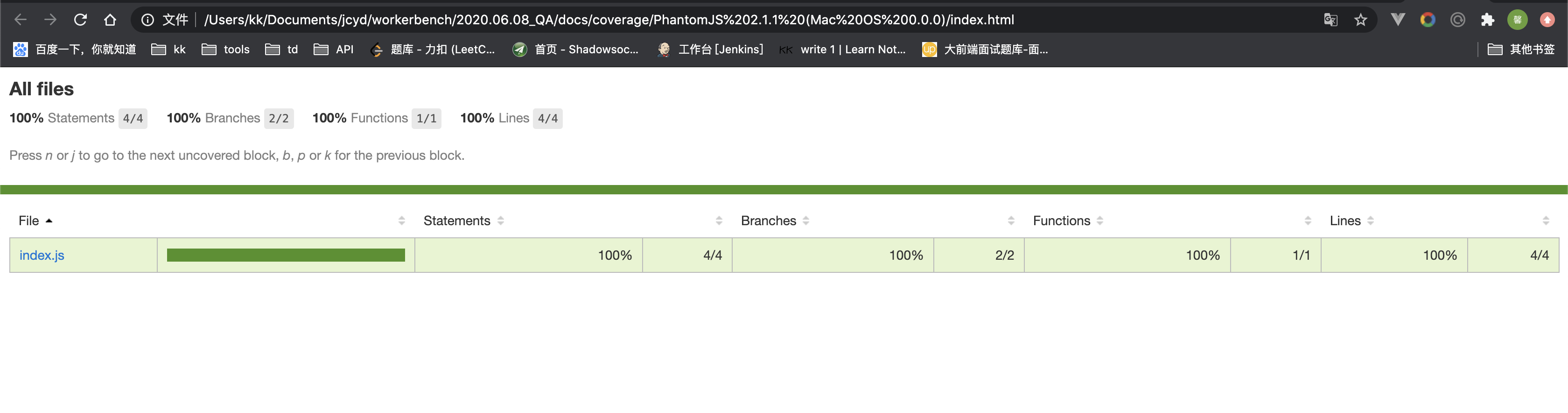
UI测试
UI自动化走查
# 全局下载
sudo npm i -g backstopjs

# 初始化
backstop init
backstop.json 配置如下
{
  "id": "qq",
  "viewports": [
    {
      "label": "phone",
      "width": 375,
      "height": 667
    },
    {
      "label": "tablet",
      "width": 1024,
      "height": 768
    }
  ],
  "onBeforeScript": "puppet/onBefore.js",
  "onReadyScript": "puppet/onReady.js",
  "scenarios": [
    {
      "label": "BackstopJS Homepage",
      "cookiePath": "backstop_data/engine_scripts/cookies.json",
      "url": "https://map.qq.com/m/", // 需要检测的url
      "referenceUrl": "",
      "readyEvent": "",
      "readySelector": "",
      "delay": 0,
      "hideSelectors": [],
      "removeSelectors": [],
      "hoverSelector": "",
      "clickSelector": "",
      "postInteractionWait": 0,
      "selectors": [],
      "selectorExpansion": true,
      "expect": 0,
      "misMatchThreshold" : 0.1,
      "requireSameDimensions": true
    }
  ],
  "paths": {
    "bitmaps_reference": "backstop_data/bitmaps_reference", // UI设计稿存储路径
    "bitmaps_test": "backstop_data/bitmaps_test",
    "engine_scripts": "backstop_data/engine_scripts",
    "html_report": "docs/backstop_data/html_report", // 报表路径
    "ci_report": "backstop_data/ci_report"
  },
  "report": ["browser"],
  "engine": "puppeteer",
  "engineOptions": {
    "args": ["--no-sandbox"]
  },
  "asyncCaptureLimit": 5,
  "asyncCompareLimit": 50,
  "debug": false,
  "debugWindow": false
}
e2e测试
selenium-webdriver
npm install selenium-webdriver -D安装专属前端的库安装对应浏览器驱动
放在根目录中
tests/e2e/baidu.spec.js
const {Builder, By, Key, until} = require('selenium-webdriver');

(async function example() {
  let driver = await new Builder().forBrowser('firefox').build();
  try {
    await driver.get('https://www.baidu.com/');
    await driver.findElement(By.name('wd')).sendKeys('mobuiin', Key.RETURN);
    await driver.wait(until.titleIs('mobuiin_百度搜索'), 1000);
  } finally {
    await driver.quit();
  }
})();
执行测试文件
node tests/e2e/baidu.spec.js
温馨提示
需要在根目录执行,否则无法找到驱动,会报错
rize
npm i -D puppeteer rize
tests/e2e/github.spec.js
const Rize = require('rize');

const rize = new Rize();

rize
  .goto('https://github.com/')
  .type('input.header-search-input', 'node')
  .press('Enter')
  .waitForNavigation()
  .assertSee('Node.js')
  .end()  // Don't forget to call `end` function to exit browser!
执行测试文件
单元测试
Mocha+chai && jest
- Mocha 主要做接口测试
tests/service/app.js
const Koa = require('koa');
const app = new Koa();

app.use(async (ctx) => {
  ctx.body = {
    data: '这是内容'
  }
});

app.listen(3000, () => {
  console.log('服务器启动成功');
});

module.exports = app;
tests/service/app.spec.js
// const axios = require('axios');
const superagent = require('supertest');
const app = require('./app');
function request() {
  return superagent(app.listen());
}

// axios.get("/").then(function(){})
describe('NodeUii 自动化脚本', function () {
  it('获取后台接口数据', function (done) { // done 结束的时候都要调用
    request()
      .get('/')
      .set('Accept', 'application/json')
      .expect('Content-Type', /json/)
      .expect(200)
      .end(function (err, res) {
        if (err) {
          done(new Error('请求出错'));
        } else {
          console.log(res.body);
          if (res.body.data == '这是内容') {
            done();
          } else {
            done(new Error('请求数据出错'));
          }
        }
      });
  });

  it('404容错脚本', function (done) {
    request().get('/user').expect(404, done);
  });
});
mochaRunner.js
const Mocha = require('mocha');

const mocha = new Mocha({
  reporter: 'mochawesome',
  reporterOptions: {
    reportDir: 'docs/mochawesome-report',
  },
});
mocha.addFile('./test/service/app.spec.js');

mocha.run(function () {
  process.exit(0);
});
运行 mochaRunner.js